Set up Traceability
Traceability is descriptive information about your data, such as:
- Shift
- Line or Machine
- Operator
- Work Order or Lot
- Serial Number
- Raw Material Batch ID
- Mold ID or Tool ID
- Line Speed and other process parameters
- Ambient values such as Temperature, Humidity, and Barometric Pressure
- ... and so forth — limited only by your imagination
If you haven't already set up your traceability, do this first:
- On the navigation menu
 , expand the Setup
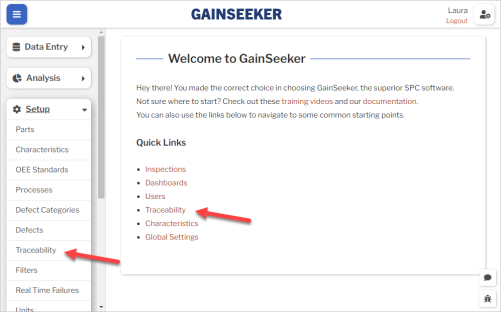
  section. Then select Traceability. Or select the Traceability link on the GS home page.
- If your traceability is already in the Traceability list, you can skip to Create Defects.
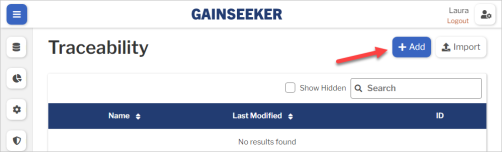
- Otherwise, select the Add button to set up one traceability.
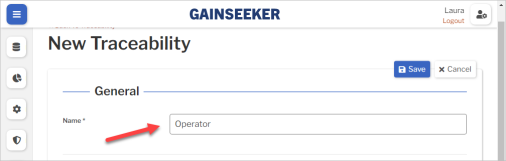
- Enter the Name of your traceability.
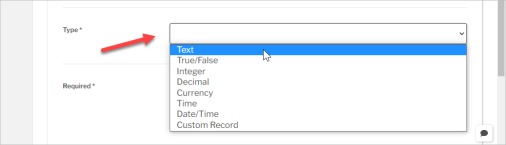
- Choose which Type of information can be entered for this traceability.
 After you save the new traceability, you cannot change its Type.
- If you're not sure, choose Text.
- (optional) To standardize and simplify data entry, you can create a list of valid traceability values like this:
-
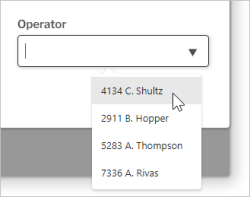
- When you choose a Type like Text, Integer, Decimal, or Currency, a Restrictions panel is displayed.
- Here you can type a Preset Value and then press the ENTER key or select the Add
 button.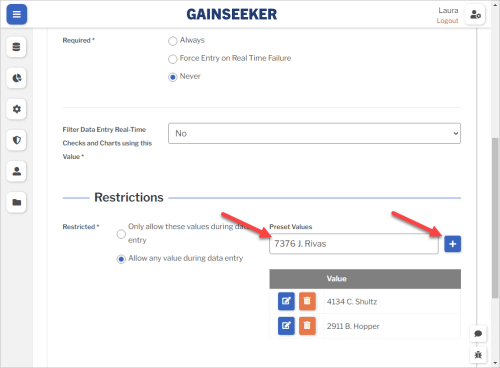
-
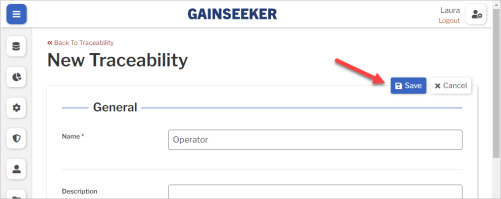
- Select the Save button at the top or bottom of the page to save your new traceability.
- Repeat these steps to add more traceability — as many as you need.
What's Next